The Secret of the Top 1% Visual Storytellers
Command High-Ticket Rates &
Achieve Location Freedom
With DaVinci Resolve 20...
...Even if you've never opened the software and are currently stuck with low-paying freelance gigs! Scale your income while living the ultimate digital nomad lifestyle in Vietnam.
Turn on the sound to hear the secret...
Our frameworks are trusted by top-tier brands:
MOBIFONE
MAZDA
NEXTGROUP
HOOZING
The 10-Step Visual Mastery
Blueprint
This is the exact battle-tested roadmap we will execute together over the next 2 months.
1. The Rough Cut
- Importing a Project
- Relinking Media Files
- Understanding Bins & Smart Bins
- Creating a New Timeline
- Adding Dialogue/Audio
- Working with Subclips
- Insert and Append Edits
- Adjusting Pacing
- "Coloring" Interviews
- Backwards Editing
2. Refining the Cut
- Project Settings
- Duplicating & Managing Timelines
- Trimming Clips
- Replace Edits
- Visual Effects (VFX)
- Adding Logos
- Creating End Titles
3. Audio & Quick Export
- Audio Mixing
- Normalizing Clip Levels
- Noise Reduction (Fairlight FX)
- Adding Audio Fades
- Mixing Soundtrack Levels
- Recording Voiceovers
- Quick Exporting
4. Primary Color Grading
- Color Page Interface
- Using Primary Color Wheels
- Video Scopes Analysis
- Grading with Lift, Gamma, Gain
- Understanding Nodes
- Executing Auto Adjustments
- Color Management Workflow
- Shot Matching Different Cameras
- Curves & HDR Wheels
5. Secondary Adjustments
- Power Windows (Masking)
- Inverting Selections (Outside Nodes)
- Secondary Adjustments with HSL
- Quick Fixes with Color Warper
- Using the Chroma Warper
- Selecting Regions with Qualifiers
- Motion Tracking
- Color Slice Tool
6. Finishing & Management
- Applying Resolve FX in Color Page
- Copying Grades
- Working with Stills
- Importing & Exporting Grades
- Professional LUTs Workflow
- Making Creative Color Decisions
7. Advanced Project Setup
- Creating New Projects & Settings
- Advanced Media Importing
- Syncing Audio with Video
- Working with Metadata
- Creating Keyword Smart Bins
- Renaming Clips via Metadata
- System Preferences Optimization
8. Fairlight Deep Dive
- Exploring the Fairlight Interface
- Setting Track Formats & Clip Channels
- Trimming in Fairlight
- AI Dialogue Leveler
- Applying EQ (Equalization)
- Layering Sound Effects
- Mixing Soundtracks
- Ducking Music Automatically
9. Fusion (VFX Mastery)
- Creating a Fusion Composition
- The Fusion Nodes Interface
- Adding the First Node & Merging
- Advanced Text Creation
- Keyframe Animation
- VFX Compositing Basics
10. Delivery & Media Management
Finalize and optimize your projects for every professional social media platform.
- Preparing Projects & Settings
- Vertical Timelines (TikTok/Shorts)
- Smart Reframe Techniques
- Navigating the Deliver Page
- Optimizing Audio Standards
- Saving Render Presets
- Adding Timelines to Render Queue
- Reviewing and Rendering
- Exporting Timelines & Project Files
- Master Media Library Management
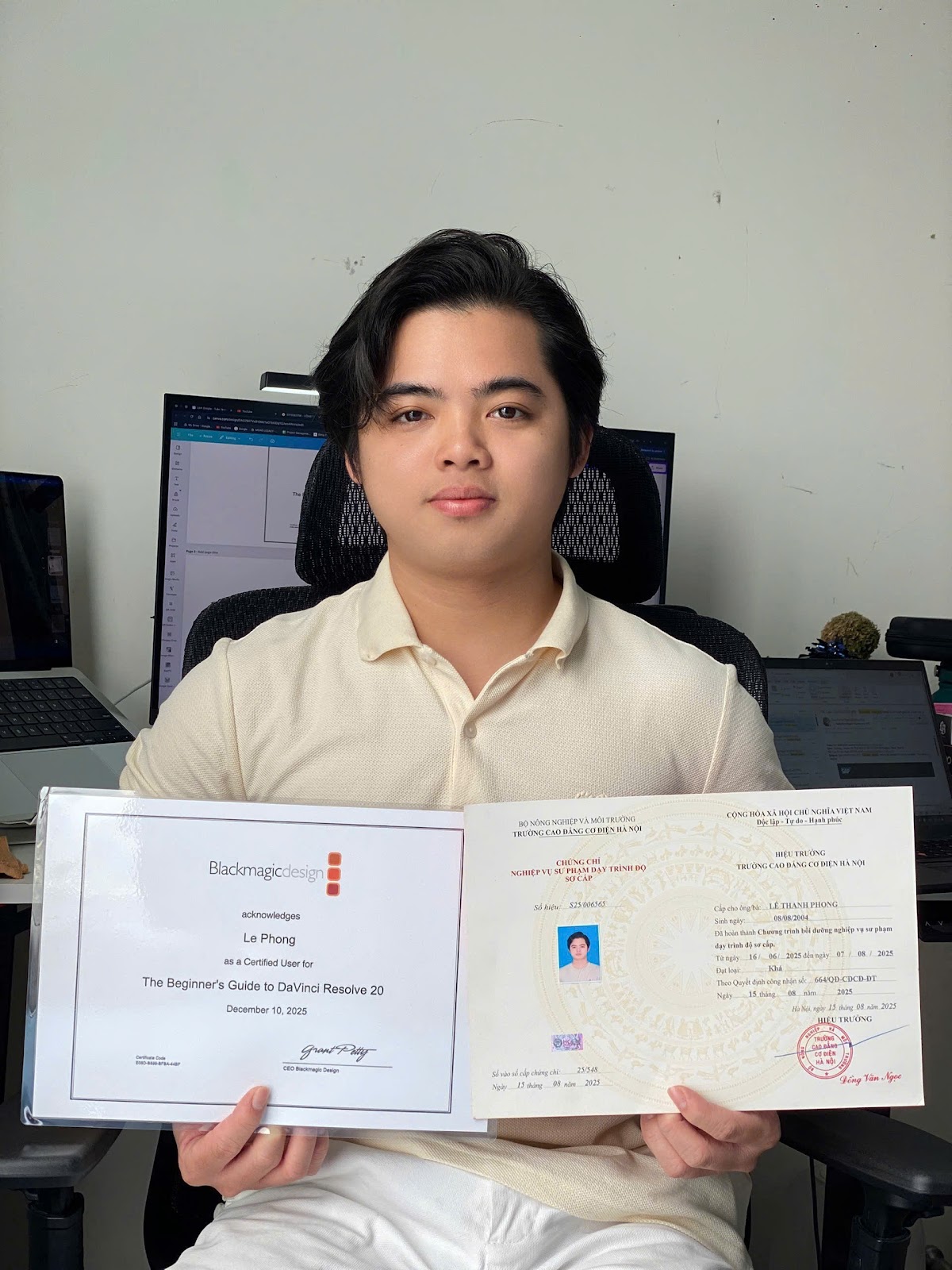
JOHN LEE
(LE THANH PHONG)
Certified Blackmagic Design Trainer
WHO IS GUIDING YOUR JOURNEY?
Hi, I'm John Lee – I will be directly mentoring you over the next 2 months to conquer DaVinci Resolve 20.
To give you confidence in investing your time and trust, here is a brief look at my journey and the "weapons" I bring to this masterclass:
"Knowing the software is only 20%. The other 80% is the storytelling mindset and professionalism in your workflow."
Global Standards
I didn't just learn DaVinci through trial and error. I am an officially Certified Trainer by Blackmagic Design. This guarantees that every piece of knowledge I pass on to you is accurate, logical, and aligns with the exact workflows used by top industry professionals worldwide.
Pedagogical Approach
The biggest difference between a "good editor" and a "good mentor" is the ability to transfer knowledge. Holding a Professional Teaching Certificate, I understand the psychology of beginners. I know how to break down complex, dry technical concepts into engaging, easy-to-understand modules.
Battle-Tested Experience
With over 3 years immersed in the post-production industry, I've proven my capabilities through real-world projects for major partners such as:
- Mobifone: Regional media campaigns.
- Mazda: TVCs and vehicle showcase videos.
- Nextgroup JSC & Hoozing.
- Top Tier Creators & KOLs.
Learn more at: Midas Legacy.
Teaching Philosophy
By joining this course, you aren't just learning which buttons to press. You are learning the craft from an industry insider with absolute dedication and passion.
I'm not just an instructor; I'm your partner in building the strongest possible foundation so you can confidently step into the global video creation market.
Insights from "million-view" projects will be woven into the lectures, helping you understand exactly: What do high-paying clients truly demand from an Editor?
4 Video Formats to
Dominate Every Platform
At EDIFY LABS, we don't teach abstract theory. You will get hands-on experience and build a "million-dollar" portfolio featuring the exact video formats leading today's digital marketing trends.
Build Authority & Trust
"Conquer camera anxiety - Become a million-view brand face"
-
Objective: Master body language, articulation skills, and professional sales content editing.
-
Application: Perfect for personal branding for KOLs, Entrepreneurs, or creating high-conversion ad campaigns.
-
Outcome: Videos with captivating hooks, modern jump-cut techniques, and irresistible Call-To-Actions (CTAs).
The Pinnacle of Aesthetics
"Elevate every frame into a professional cinematic masterpiece"
-
Objective: Showcase cinematography techniques, framing psychology, and elite Color Grading skills.
-
Application: Producing premium product TVCs, luxury hotel/travel reviews, or short films.
-
Outcome: 30-second artistic sequences, dramatic soundscapes, and seamless transitions that multiply brand value.
Emotional Narrative Art
"Turn everyday moments into deeply resonant emotional journeys"
-
Objective: Hone Storytelling skills and evocative Voice-over techniques to create profound connections with viewers.
-
Application: Building a personal YouTube channel, creating Daily Vlogs, or documenting your digital nomad journey to attract a loyal fanbase.
-
Outcome: Engaging plot pacing and high-quality, relatable imagery that keeps audiences hooked on your story.
Mastering Engagement Algorithms
"Grasp the 'Trend' formula - Hit 100k+ likes using just your phone"
-
Objective: Develop sharp instincts for cross-platform algorithms and master retention techniques within the "golden 3 seconds."
-
Application: Ideal for Creators on TikTok, Reels, and Shorts aiming for rapid follower growth or Affiliate Marketing.
-
Outcome: Fast-paced Transformation videos, Tips, or comedic content that generate massive viral reach on social media.
They Scaled Their Income,
And You Will Too!
"Every frame carries its own soul when you truly understand the language of color. The course at Edify Labs provided us with a systematic post-production workflow, giving us the confidence to execute high-end commercial projects."
Doan The & Van Nghia La
Alumni of DAVINCI MASTERCLASS - ED001
HERE IS WHAT YOU ARE GETTING TODAY:
Claim Your Offer
Fill out the details below to secure your spot and instantly unlock the entire exclusive creator toolkit.
FREQUENTLY ASKED QUESTIONS
I've never used DaVinci Resolve before. Can I keep up? +
Absolutely. The Edify Labs roadmap is designed to guide you from the very basics (importing projects, rough cuts) to advanced mastery. The instructor provides step-by-step guidance on every tool so you get up to speed quickly.
Will this course help me get freelance clients? +
Definitely! The course goes beyond technical skills. We teach you how to package your services, negotiate rates with clients, and build an undeniable portfolio so you can confidently land international and domestic gigs immediately after completion.
What computer specs are required? +
Recommended specs: Modern PC (i5/Ryzen 5), 16GB RAM, 4GB+ VRAM GPU. For Mac users: Macbook Pro M1 (16GB RAM) or Macbook Air M3 and above.
What is the format and schedule of the course? +
The roadmap consists of 12 intensive Masterclass sessions. Learning is conducted via interactive online platforms with the instructor, allowing for real-time Q&A. The schedule is flexible to accommodate busy professionals and digital nomads.
What if I'm too busy to attend live sessions? +
Don't worry! All sessions are recorded in high quality. You can review them anytime on our learning platform, and you will still receive lifetime 1-on-1 personal support throughout your editing career.
Just Secured Pro Slot
Alex Mitchell
Nomad in Da Nang